
Why Low’s Adventures 2 Can Be a Useful Classroom Brain Break Game

Low’s Adventures 2 is a browser-based classroom brain break game that gives students a short recreational activity built around coin collection, jumping challenges, and platform puzzles strategy game. When digital games are permitted, teachers can use a brief, supervised session to introduce a change of pace between lessons.
The game involves judging distances, planning movements, avoiding obstacles, and adjusting strategies after a failed attempt. These mechanics create opportunities to discuss spatial reasoning, computational thinking, and problem-solving. However, playing the game alone does not establish that students will achieve measurable academic improvements.
For teachers and parents, the priority is to review the Cool Math 4 Games before use, confirm that it is appropriate for the students’ age group, and follow school technology policies. A browser game can complement classroom activities, but it should not replace physical movement, social interaction, or structured learning.
What Makes Low’s Adventures 2 a Choice Among Safe Browser Games for Kids?
Low’s Adventures 2 offers a straightforward platform-game format in which players move between platforms, collect coins, avoid obstacles, and reach a trophy to complete a level. Its clear objective can make the game easier to understand during a short, supervised break.
When evaluating safe browser games for kids, teachers and parents should look beyond the game title. Review the actual game content, advertisements, privacy information, website reputation, and compatibility with the school’s approved browser. A familiar gaming website or a search result is not, by itself, proof that a page is safe.
Before using Low’s Adventures 2 in a classroom, consider these practical checks:
- Simple gameplay: Check whether students can understand the movement and jumping controls.
- Clear objectives: Confirm that the coin-collection and trophy goals are appropriate for the intended activity.
- Problem-solving opportunities: Look for moments when students must plan a route, judge a gap, or change their approach.
- Defined break time: Set a short duration appropriate to the class schedule.
- Website safety: Check for unexpected downloads, suspicious advertisements, and requests for unnecessary personal information.
Preview the game on the device students will use. Confirm that access is permitted by the school, and provide a non-digital alternative for students who cannot or should not use the game.
Playing Low’s Adventures 2 Unblocked: The Perfect Game to Bypass School Filters Safely
Students are always on the lookout for safe, browser-based games that can easily bypass strict school network filters during free time. While most entertainment websites get blocked quickly, games like Low’s Adventures 2 often remain accessible as “unblocked games” and there is a very good reason for it!
Instead of fighting it, many teachers actually love when students play Low’s Adventures 2 during brain breaks. Because it is often hosted on trusted educational platforms, it naturally slips past school firewalls. But the real reason teachers approve of this unblocked game is its hidden educational value. It acts as a fun escape for students while secretly building core academic skills.
Here is why this unblocked game is a win-win for both students looking for fun and teachers looking for safe classroom activities:
- Zero Violence: Unlike many blocked games, it offers a completely safe, family-friendly environment with no inappropriate content.
- Builds Spatial Reasoning: Players must accurately judge distances between platforms and time their jumps perfectly to survive.
- Boosts Computational Thinking: Figuring out the right sequence to collect coins, use ladders, and hit switches requires logical, step-by-step planning.
- Encourages Problem-Solving: Failing a level isn’t just a “game over”, it forces players to analyze their mistakes, adjust their strategy, and try a new route.
How Low’s Adventures 2 Can Support Spatial Reasoning, Computational Thinking, and Problem-Solving
Low’s Adventures 2 contains gameplay mechanics that can be used to discuss planning, spatial awareness, and problem-solving. These are potential learning connections rather than proof that the game independently improves academic performance or that all teachers recommend it.
Here are examples of how its mechanics relate to these skills:
- Spatial reasoning: Players judge the distance between platforms, identify gaps, and estimate when to jump.
- Computational thinking: Players can plan a sequence of movements, test the sequence, observe the result, and adjust their approach.
- Problem-solving: Coins, ladders, switches, and obstacles encourage players to consider different routes and possible solutions.
- Decision-making: Players decide when to move forward, wait for an obstacle, or explore another route.
- Perseverance: Repeated attempts can provide opportunities to reflect on mistakes and try a different strategy.
Teachers can make the activity more purposeful by asking students to explain their planned route before attempting a difficult section. After the game, a brief discussion can explore which strategy worked and why.
How to Play Low’s Adventures 2 (Basic Controls & Gameplay: How to Pass Each Level)
The objective is simple: collect all the required coins, then reach the trophy that appears to complete the level. Each stage introduces obstacles that require timing, exploration, and careful movement.
| Action | Controls or strategy |
|---|---|
| Move left | A or Left Arrow |
| Move right | D or Right Arrow |
| Jump | W or Up Arrow |
| Climb a ladder | Press W or Up Arrow while positioned at the ladder |
| Activate a switch | Walk into the switch when the level provides one |
| Glide across a wide gap | Pick up an umbrella and hold the jump control while airborne |
| Complete the level | Collect every required coin and reach the trophy |
Five practical tips for winning a level:
- Scan the screen first. Notice coins, enemies, ladders, moving platforms, and gaps before rushing forward.
- Collect coins methodically. Check the visible paths rather than assuming the trophy is immediately reachable.
- Use the level’s objects. Switches may unlock blocked routes, while umbrellas can help you cross wider gaps.
- Time your jumps carefully. Watch enemy movement and moving platforms before committing to a jump.
- Learn from failed attempts. Change your timing or route instead of repeating the same mistake.
A useful classroom variation is to ask students to explain their route before trying a difficult section. This transforms a quick game into a short exercise in planning and communication.
Gameplay Observations: What to Check Before a Classroom Brain Break
Low’s Adventures 2 combines platform navigation, coin collection, jumping challenges, and trophy-based level completion. Players need to observe platform distances, avoid hazards, and choose suitable routes to progress. These mechanics provide practical examples of spatial reasoning, planning, and problem-solving during a short gaming session.
For classroom use, teachers should review the game’s controls, level objectives, visible enemies, and obstacles before recommending it to students. They should also check whether the game loads appropriately in the school’s approved browser and whether advertisements, privacy concerns, or network restrictions could affect the experience. Suitability depends on students’ ages, classroom expectations, and school technology policies.
The game’s challenges can encourage students to think about why a route works, how to adjust a failed attempt, and which steps might lead to the goal. However, these are potential learning opportunities rather than proven academic outcomes. Teachers should base their decision on the actual gameplay they review and treat the game as a brief recreational activity rather than a substitute for structured instruction.
Where to Find Low’s Adventures 2: Cool Math Games and Math Playground
Students searching for lows adventures 2 cool math games or lows adventures 2 math playground may encounter different websites and game listings. Before playing, check the exact domain, confirm that the page contains the intended game, and follow any school restrictions.
Here are two relevant places to check:
- Coolmath Games: Visit the Low’s Adventures 2 game listing. Review the current game page and its instructions before using it in a classroom.
- Math Playground: Visit Math Playground. Search its current game catalogue for Low’s Adventures 2 and confirm that the specific listing is available.
The phrase Cool Math 4 Games may also appear in searches for browser-based entertainment. Search phrases alone do not establish that a particular website is official, safe, or approved by a school.
When comparing game listings, check the game’s controls, content, browser compatibility, and any advertising or privacy considerations. Availability can change, and access depends on the device and network settings. If a game is not permitted on the school network, choose an approved alternative rather than attempting to bypass restrictions.
The Evolution of the Game: From Low’s Adventure 1 to Lows Adventure 3
The original Low’s Adventures introduces the central coin-collection and trophy objective. Low’s Adventures 2 builds on this familiar format with additional challenges involving enemies, ladders, switches, moving platforms, and umbrella-assisted gliding.
Players who enjoy the sequel may also look for Lows Adventure 3. However, game availability and sequel details can vary across third-party portals, so verify the individual game’s listing before assuming it is an official continuation available on the same platform.
The progression provides a useful way to discuss game design: a familiar goal keeps the experience accessible, while new obstacles and movement challenges make later stages more demanding.
Looking for More? Top Cool Math Games Unblocked at School
If your class enjoys puzzle-platforming, consider other browser games that suit the available time and the school’s rules. Searches for Cool Math 4 Games can produce many choices, but the best option depends on the learning objective, device compatibility, and age group.
Consider these alternatives:
- Logic puzzles: Encourage careful reasoning and trial-and-error thinking.
- Pattern and sequence games: Give students a chance to recognize rules and predict outcomes.
- Simple platformers: Practise timing, coordination, and spatial awareness.
- Word games: Offer a language-focused break through spelling and vocabulary.
- Number puzzles: Keep mathematical thinking active without turning the break into a full lesson.
Choose games through approved platforms and confirm that they load without requiring unofficial software or bypassing network restrictions.
5 Most Popular Physical Classroom Games for Students
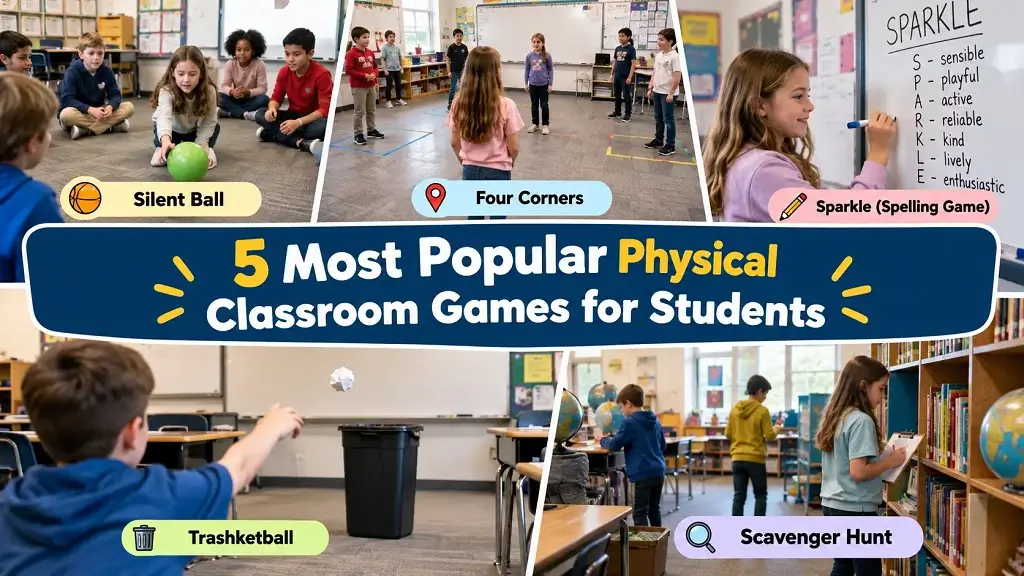
Digital games can be convenient, but physical classroom games provide face-to-face interaction and movement. Switching between screen-based and offline activities helps teachers offer different kinds of breaks throughout the school day.
1. Silent Ball
Students gently toss a soft ball while remaining silent. If someone drops the ball or breaks the agreed rule, they sit out briefly or follow the teacher’s chosen variation. Use clear safety boundaries and avoid hard projectiles.
2. Four Corners
Label the four corners of the room. One student closes their eyes while classmates select a corner; the student then calls a corner, and those standing there follow the agreed elimination or rotation rule. Keep movement calm and accessible.
3. Sparkle (Spelling Game)
Students stand in a circle and spell a chosen word one letter at a time. After the final letter, the next student says “Sparkle,” following the teacher’s rules. It is an easy way to combine a quick break with spelling practice.
4. Trashketball
Place a wastebasket at a safe distance and let students throw paper balls toward it. Teachers can introduce addition, multiplication, or quick-answer questions to connect the game with classroom review. Use waste paper and establish a clear throwing line.
5. Scavenger Hunt or Would You Rather
A short scavenger hunt asks students to locate teacher-approved objects or identify items matching a clue. Alternatively, Would You Rather? prompts students to choose between two options and explain their reasoning. The first adds movement; the second builds discussion and listening.
How to Choose the Best Brain Break Games for Your Students: Indoor vs. Outdoor
The most suitable classroom brain break game is the one that matches your students’ energy, available space, accessibility needs, and remaining break time. Use the table below as a practical starting point.
| Factor | Digital brain break | Indoor physical game | Outdoor activity |
|---|---|---|---|
| Best for | Short, individual puzzles | Controlled movement and review | High-energy movement |
| Space needed | A compatible device | Classroom or cleared area | Playground or open space |
| Social interaction | Optional or partner-based | Usually face-to-face | Often group-based |
| Main consideration | Screen access and school rules | Furniture and safe movement | Weather, supervision, and boundaries |
| Suggested use | A brief, timed session | Quick transitions or review | Longer movement breaks |
Indoor Games: Best for Controlled Energy and Academic Review
Indoor activities are useful when the weather prevents outdoor play or the class needs a quieter transition. Silent Ball, Sparkle, and short word puzzles can fit into small spaces without requiring extensive preparation.
Choose activities that allow every student to participate comfortably and keep pathways clear. For digital activities such as Low’s Adventures 2, set a firm time limit and have students return to their regular work promptly.
Outdoor Games: Best for Movement and High-Energy Breaks
Outdoor brain breaks give students more room to move, stretch, and interact. Four Corners can be adapted to an open space, while supervised scavenger hunts can encourage observation and cooperation.
Before starting, establish boundaries, explain the rules, and check the playing area. Offer alternatives for students who need lower-impact or less physically demanding activities.
Pro Tips for Choosing Between Indoor and Outdoor Games
Use these practical guidelines when planning a break:
- Match the mood: Choose quieter puzzles when students need a calm transition and movement games when they need to release energy.
- Set a clear duration: A short activity should have a defined beginning and end.
- Keep participation inclusive: Provide options for different physical abilities, confidence levels, and learning needs.
- Connect to the next lesson: Use a quick question or reflection to help students refocus.
- Rotate activities: Avoid relying on screens or a single physical game every day.
Final Thoughts
Low’s Adventures 2 can be a useful option for a short classroom brain break when its content, device compatibility, and school rules make it appropriate. Its coin-collection goals, platform challenges, and movement mechanics provide opportunities to discuss spatial reasoning, computational thinking, planning, and perseverance.
Before introducing the game, teachers and parents should preview the gameplay, set a clear time limit, and confirm that students are allowed to access it. Searches for safe browser games for kids or Low’s Adventures 2 unblocked should not replace checks of the actual website and school policy.
The best classroom brain break is one that fits students’ needs and helps them return to learning without disrupting the school day. Balance digital activities with physical games, discussion, and movement, and treat the game’s potential learning benefits as opportunities to explore rather than guaranteed educational outcomes.
FAQs About Classroom Brain Break Games
1. Are unblocked browser games safe for school networks?
Not automatically. A browser game may be free of downloads yet still appear on a website with intrusive advertisements or questionable privacy practices. Use approved sites, check their content, and follow school network policies. Never bypass a school filter simply to access a game.
2. Which is better for a 5-minute break: digital puzzle games or physical activities?
Both can work. A digital game such as Low’s Adventures 2 suits students who enjoy short problem-solving challenges, while a physical activity may be better when students need movement. Choose based on classroom energy, accessibility, and the purpose of the break.
3. How do you complete a level in Low’s Adventures 2?
Collect every required coin in the level to make the trophy available, then reach the trophy. Check hidden routes, activate switches when needed, and use ladders or the umbrella mechanic to reach difficult areas.
4. Can Cool Math 4 Games be used as an educational classroom resource?
Some games available through established browser-game platforms offer opportunities to practise planning, logic, coordination, or problem-solving. However, Cool Math 4 Games is a search phrase rather than a guarantee of educational quality. Teachers should review each specific game and connect its use to a clear learning or break-time objective.
Featured Games — Play Without Leaving This Page
Click any card to play instantly — no download, no sign-up required.
 Brick Breaker
 Awesome Tanks 2
 Run 3 – Temple Scientist
 Ben 10 Alien Run
 Football Bros
 Math Playground
 Red Ball 4
 Planet Clicker
 Tap Tap Racing
 Block Blast
 Tiny Fishing
 Tetris Master
 Loaf Clicker
 Snowrider
 Ultimate Trivia Quiz
 Candy Clicker
 Drift Boss Supercar
 Dino Game
 Math Duel
 Low’s Adventures 3
 Math Challenge For Kids
 Cookie Clicker
 Snake Game
 Math Trivia

1 Comment
Comments are closed.